Learn AutoCAD with our Free Tutorials
Welcome to CADTutor
CADTutor provides the best free tutorials and articles for AutoCAD, 3ds Max and associated applications along with a friendly community forum. If you need to learn AutoCAD, or you want to be more productive, you're in the right place. See our tip of the day to start learning right now!
Free Tutorials and More…
The Tutorials section provides over 100 original tutorials for AutoCAD, 3ds Max and other design applications. Michael’s Corner is an archive of productivity articles that brings you the best AutoCAD tips and tricks. Our Forum is a lively community where AutoCAD users can ask questions and get answers. The Downloads area provides free AutoCAD blocks, free AutoLISP routines and free images.
Tutorials of the Moment
Recently viewed tutorials
-
AutoLISP Quick Start

This tutorial is designed to help AutoCAD users get to grips with AutoLISP quickly. It demonstartes how to create AutoLISP routines from a standing start. Format: Text/Image
Last visited: 3 minutes ago
-
ISO Paper Sizes

There has alwas been some confusion over the size of standard ISO drawing sheets with AutoCAD.The stated sizes in the plot dialogue box are not the true ISO sizes. This tutorial explains why and how to plot to scale from Model Space. Format: Text/Image
Last visited: 3 minutes ago
-
The UCS Icon

All about the UCS icon. Format: Text/Image
Last visited: 4 minutes ago
-
Units and Scales

If you're asking yourself "what scale do I draw in?" or "what units should I use?", you need this tutorial. Format: Text/Image
Last visited: 6 minutes ago
-
Entering Survey Data using AutoCAD

These techniques apply to basic CAD programs such as AutoCAD, IntelliCAD, etc. If you have a civil/survey program or add-on, such as Land Desktop, SurvCADD, Eagle Point, etc., then there are built-in tools for entering lines and curves. Format: Text/Image
Last visited: 6 minutes ago
-
Options for Creating Objects

There are a number of ways of creating the three main elements of a landscape scene, surfaces, edges and objects, each one demending an understanding of the creation methods and tools at hand. This tutorial shows you how. Format: Text/Image
Last visited: 7 minutes ago
CADTutor Tutorials
Our tutorials are comprehensive but straightforward introductions to AutoCAD and related software. They are designed to help beginners get to grips with design workflows as quickly as possible. There are over 100 to choose from, some text/image based and others in video format. Whatever stage you are at in your learning, you should find a tutorial to help.
Forum Latest
Currently Active Topics
Move to new layer with suffix
by Chmcdan211
15 replies
Last post: 6 minutes ago
Create 3D Angled/Bevelled/Chiselled Text
by Dahzee
7 replies
Last post: 11 minutes ago
Revcloud around polyline object, on both sides but retain polyline
by Monty Lisp
3 replies
Last post: 3 hours ago
converting single 3dpolyline zigzag string into two separate 3dpolylines
by pyou
2 replies
Last post: 8 hours ago
How to Exclude Files from vl-directory-files
by Whitt
4 replies
Last post: 10 hours ago
Material Bubs
by bonehead_96
3 replies
Last post: 10 hours ago
This Week's Hot Topics
Autocad Software
by Emboss 2014
13 replies
Viewed: 352 times
edit lisp by itself
by mohammadreza
8 replies
Viewed: 359 times
How to find out the average Azimuth of 2 Lines??
by duke
6 replies
Viewed: 357 times
XDATA, what it is for and how it works (Please)!!
by duke
6 replies
Viewed: 322 times
3 points SLICE command didn’t work for me
by Emboss 2014
5 replies
Viewed: 184 times
How to Exclude Files from vl-directory-files
by Whitt
4 replies
Viewed: 240 times
CADTutor Forums
Our forum is a vibrant community of experts and beginners. The main focus is helping beginners get to grips with AutoCAD and to help more advanced users become more productive. The AutoLISP forum is one of the busiest out there, providing expert advice for busy professionals.
AutoCAD Productivity
Text Frame on Mtext
From: AutoCAD Productivity Articles #148
Originally published: October 2016
Yes, you can Enclose Text in Objects from Express Tools — See Michael's Corner, June 2004 — but when using the Text Frame property on Mtext, the frame adjusts when you size the Mtext or change the text content!
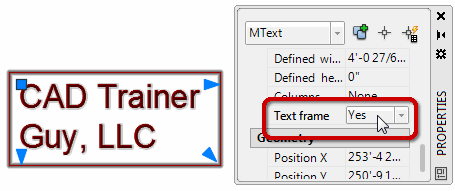
Just select your Mtext, open Properties [Ctrl 1], then set Text Frame to <Yes>.
To test it, change the size of your Mtext or edit the content and the frame automatically adjusts!
See all the articles published in October 2016
Michael's Corner
Between 2003 and 2016, Michael Beall (and one or two guests) wrote almost 600 articles for CADTutor. The focus of these articles is AutoCAD productivity, and although some of them are now more than a few years old, most remain relevant to current versions of AutoCAD. The article above is just one example. Check out Michael's Corner for a full listing.
Image of the Week
-
6th – 12th May 2024
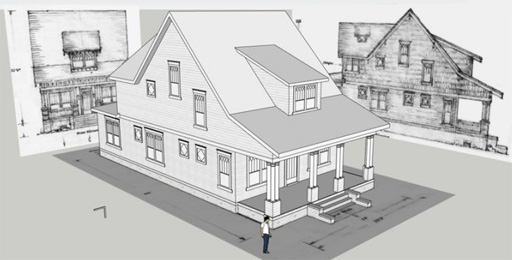
This week's image is by f700es
Software used: SketchUp
-
Last Week's Image

Last week's image is by Frontop
Software used: AutoCAD Architecture 2010
-
Two Weeks Ago

This image is by kayaan
Software used: AutoCAD 2010
-
Three Weeks Ago
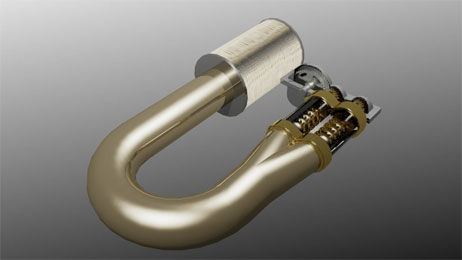
This image is by medhet
Software used: AutoCAD 2012
Gallery of Work
Over the years, our forum members have contributed hundreds of images, showcasing their amazing work. The images above are just a small selection that demonstrate the wide range of project types our community is involved with. Take a look at our gallery to see all the images published in the last 12 months.
Tip of the Day
Mid Between 2 Points (m2p)
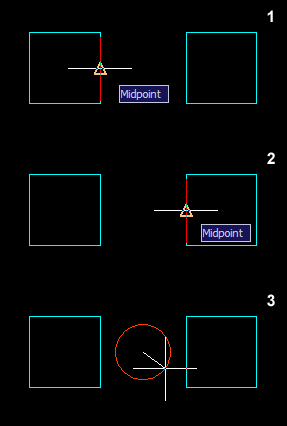 Sometimes you might want to find a point midway between two other points. In the past, you might have drawn a line between these two points and then used "Snap to Midpoint" but this requires the drawing of a construction line and isn't very efficient.
Enter the m2p object snap. This will find the midpoint between any two picked points without the need for a construction line.
How it works: Say you want to draw a circle midway between two squares, start the circle command and then enter "m2p" when prompted to specify the center point. Now just follow the prompts.
Command: circle
Specify center point for circle or [3P/2P/Ttr (tan tan radius)]: m2p
First point of mid: (pick first point)
Second point of mid: (pick second point)
Specify radius of circle or [Diameter] <20.000>: (pick to complete circle)
Missed a Tip?
Did you miss yesterday's tip? Maybe you forgot to drop by or maybe you don't visit over the weekend. If so, you can now see all the tips published during the past week. Also, if you have a tip you'd like to share with us, you can post it on our forum and if we like it, we'll publish it here.